
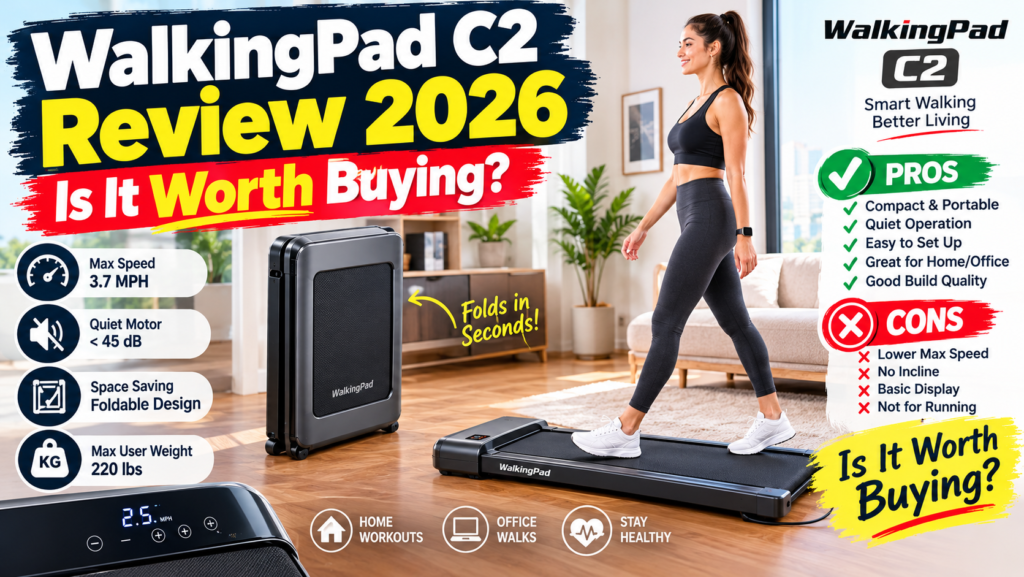
WalkingPad C2 Review 2026: Explore its speed, foldable design, noise, portability, under-desk use, walking performance, features, pros, cons, and overall value.
LifeCareBalance.com is reader-supported. When you buy through links on our site, we may earn an affiliate commission at no extra cost to you. As an Amazon Associate, we earn from qualifying purchases.
The WalkingPad C2 is a compact, foldable walking treadmill designed for people who want to walk indoors without giving up permanent floor space. Its main appeal is straightforward: the deck folds in half, the machine has a low profile, and its controls are designed for simple walking sessions at home or in a home office.
However, a compact design does not automatically make a treadmill the right purchase. The C2 has a relatively narrow walking belt, a manufacturer-listed maximum user weight of 220 pounds, and a speed range intended for walking rather than conventional running workouts. Its value also depends on the price you find and whether you will actually use the folding mechanism regularly.
Quick answer: The WalkingPad C2 is worth considering if compact storage is your priority and you want a dedicated walking machine for a small apartment or home office. Skip it if you need running speeds, incline training, a wider walking surface, or a higher weight capacity.
This review focuses on the C2’s published specifications, practical buying considerations, limitations, and alternatives. It is a research-based review of available product information, not a claim of independent hands-on testing.
WalkingPad C2 Review: Quick Verdict
- Best for: Apartment residents, casual walkers, and home-office users.
- Main advantage: A folding design that reduces the space needed for storage.
- Main drawback: Limited walking-focused performance and no powered incline.
- Speed range: Manufacturer-listed 1–4 mph; confirm the exact revision before purchase.
- Walking area: Approximately 47.2 × 15.7 inches.
- Maximum user weight: 220 pounds (100 kg), according to the manufacturer’s published specifications.
- Machine weight: Approximately 55 pounds (25 kg).
- Storage: Folds in half and has transport wheels.
- Controls: Remote control, FootSense automatic mode, and KS Fit app support.
- Running suitability: Not recommended as a conventional running treadmill.
- Overall verdict: A specialist choice for compact storage, not a universal solution for every home workout.
WalkingPad C2 Specifications

- Truly Folding Design – Walking Pad C2 features an exclusive folding design that allows for easy 180 ° folding of the tre…
- Powerful Silent Motor – This under-desk treadmill boasts a 2.0HP motor capable of supporting up to 220 lbs. Operating qu…
- Portable – There’s no assembly required for the walkingPad, simply unfold the treadmill, plug it in and it’s ready to us…
The following table summarizes the manufacturer’s published specifications. Product revisions, regional listings, and retailer descriptions can differ, so verify the exact model offered before ordering.
| Specification | Published information |
|---|---|
| Product type | Folding motorized walking treadmill |
| Unfolded dimensions | 56.9 × 20.4 × 4.9 inches |
| Folded dimensions | 32.5 × 20.4 × 5.4 inches |
| Walking surface | Approximately 47.2 × 15.7 inches |
| Net weight | Approximately 55 pounds |
| Maximum user weight | 220 pounds (100 kg) |
| Speed | Manufacturer listings commonly show 1–4 mph |
| Incline | No powered incline |
| Controls | Remote, FootSense, and KS Fit app |
| Display | Built-in display for basic workout metrics |
| Assembly | Marketed as ready to use without full assembly |
| Motor | Brushless motor; published horsepower figures vary across listings |
| Warranty | Check the warranty for the exact seller, model, and purchase region |
The manufacturer’s WalkingPad C2 product page is the best starting point for checking dimensions and current specifications. Do not assume an old review or retailer listing reflects every detail of the model currently available.
Why the specifications matter
The C2’s dimensions explain both its appeal and its limitations. A folded length of approximately 32.5 inches can make storage easier than keeping a full-size treadmill permanently assembled. However, the machine still weighs about 55 pounds, so folding it does not make it effortless to carry.
The walking surface is also narrower than the belt on some larger treadmills. That may be acceptable for a user who walks comfortably at a controlled pace, but people with a longer stride or who prefer extra side-to-side room should compare the deck dimensions before buying.
What Is the WalkingPad C2?
The WalkingPad C2 is a low-profile treadmill built primarily for walking at home. Unlike a conventional treadmill with a large console and upright handrails, the C2 uses a compact deck, a small display, and simple control options.
Its defining feature is the hinge that lets the walking platform fold in half. When unfolded, it can be used for indoor walking. When finished, the user can fold it and roll it toward a storage area.
This design addresses a common problem for people who live in apartments, share a room with a workstation, or do not have a dedicated exercise room. A traditional treadmill may take up valuable floor space even when it is not being used. A foldable walking pad offers another option, provided the user has somewhere suitable to store it.
The C2 is not designed to replace every treadmill. Its appeal is convenience and compact storage rather than running performance, advanced training programs, or incline workouts.
Design, Folding, and Storage
The main advantage: A compact folded footprint
The C2’s folding mechanism is its strongest selling point. Its published folded dimensions are approximately 32.5 × 20.4 × 5.4 inches, making it easier to store beneath some beds or sofas, or beside a wall.
Before buying, measure the intended storage location. Check the clearance under furniture, the width of the route to the storage area, and whether the folded machine can be moved safely without scratching the floor.
Also consider the space required to unfold and use it. A treadmill may fit beneath a bed but still be inconvenient if there is not enough room to set it up and walk safely.
It is compact, but not lightweight
At approximately 55 pounds, the C2 is not a featherweight device. Its transport wheels can help move it across a suitable floor, but stairs and frequent room-to-room transfers may be inconvenient.
Think of the folding system as a way to reclaim nearby floor space, not as a guarantee that the treadmill can be moved easily by every user.
Build and belt considerations
The manufacturer describes the C2 as having a layered walking belt and shock-absorbing materials. Those are product-design claims, not independent proof that the machine prevents injuries or produces a particular reduction in joint impact.
Check the belt surface, frame, hinge, and controls when the product arrives. Follow the manufacturer’s instructions for placement and maintenance, and stop using the machine if you notice unusual movement, damage, or a persistent mechanical problem.
Walking Performance: What Can You Expect?
The C2 is designed for walking-focused exercise. Its commonly published top speed of 4 mph is sufficient for many casual and brisk walking sessions, but the machine does not offer the speed range or handrail arrangement expected from a conventional running treadmill.
For most buyers, the useful question is not whether the C2 can reach a particular top speed. It is whether the machine offers a comfortable, controlled pace that fits their intended routine.
Is the walking surface large enough?
The walking area measures approximately 47.2 inches long and 15.7 inches wide. These dimensions are useful for comparing the C2 with other compact models.
A shorter or narrower deck may feel restrictive for people with a long stride, those who prefer a wider walking stance, or anyone who feels uncomfortable walking close to the belt edges. If possible, compare the dimensions with a treadmill you already know or look for a retailer with a suitable return policy.
Can you run on the WalkingPad C2?
The C2 should be treated as a walking machine rather than a running treadmill. Its limited speed range, low-profile design, and lack of conventional running handrails make it a poor choice for sprint intervals or serious running workouts.
Do not attempt to compensate for its limitations by exceeding the manufacturer’s instructions. If running is one of your main goals, choose a treadmill explicitly designed and rated for that use.
Does it have incline?
The C2 does not offer powered incline training. That matters if you want to vary workout difficulty through uphill walking.
You can adjust walking pace within the machine’s supported range, but that is not equivalent to an incline feature. Buyers who specifically want incline workouts should compare suitable alternatives instead of assuming a compact walking pad will offer them.
Under-Desk Walking: Is the C2 a Good Fit?
Under-desk walking is one of the C2’s most relevant use cases. Its low profile may allow it to fit beneath a compatible standing desk, and the remote or app can make speed changes more convenient during a walking session.
However, desk compatibility depends on the complete setup, not simply the treadmill’s height.
Before using the C2 under a desk, check:
- Desk clearance: The deck must fit comfortably beneath the desk at the intended working height.
- Walking posture: You should be able to walk without leaning forward, reaching awkwardly, or striking the desk.
- Keyboard and mouse access: Your arms and shoulders should remain comfortable.
- Task demands: Typing, reading, and video calls may be easier than tasks requiring precise hand movements.
- Noise: Motor sound and footfalls can travel through floors and shared walls.
- Safe access: Leave enough room to step onto and off the machine without tripping over furniture or cables.
For more options designed specifically for workstations, see LifeCareBalance’s guide to best under-desk walking pads in 2026.
A walking pad can add movement to the workday, but it is not necessary to walk continuously while working. Short, comfortable sessions and regular breaks may be more practical than trying to perform every task while moving.
Controls and the KS Fit App
The C2 offers several ways to control a walking session.
Remote control
The remote provides a simple way to start, stop, or adjust speed without opening an app. Keep it somewhere easy to reach, and learn how to stop the belt before beginning a session.
FootSense automatic mode
FootSense is designed to adjust the belt according to the user’s position on the walking surface. The concept is convenient, but automatic control may not suit everyone. Some users may prefer a predictable manual speed instead of relying on position-based adjustments.
Do not assume automatic mode will feel intuitive immediately. Read the manual and learn how the system behaves at a slow, controlled pace before using it during other activities.
KS Fit app
The manufacturer lists KS Fit app support for compatible C2 versions. The app can provide access to workout data and control functions, depending on the product version and software configuration.
App functionality can change with updates, phone compatibility, and account settings. If you prefer to exercise without a smartphone, confirm that the physical controls provide the functions you need.
For current model differences, the manufacturer’s WalkingPad comparison page can help you compare the C2 with other models in its lineup.
WalkingPad C2 Pros and Cons
Pros
- Folds in half for more flexible storage.
- Low-profile design may fit under compatible furniture or standing desks.
- Built-in wheels help move the unit across suitable floors.
- Remote and app-based controls provide different operating options.
- The display provides basic workout information.
- Designed for indoor walking without requiring a full gym room.
Cons
- Maximum user weight is listed at 220 pounds.
- Walking belt is relatively narrow compared with some alternatives.
- No powered incline.
- Not intended for conventional running workouts.
- At around 55 pounds, it may be awkward to carry up stairs.
- Automatic speed control may take practice.
- Motor specifications and advertised prices should be checked against the exact current listing.
- A compact design does not guarantee quiet operation in every home or apartment.
WalkingPad C2 vs. A1 Pro and P1
The C2 is not the only compact model in the WalkingPad family. The A1 Pro and P1 are alternatives worth comparing, but specifications and product configurations can change. Confirm the exact version before using any comparison table to make a purchase decision.
| Buying consideration | WalkingPad C2 | WalkingPad A1 Pro | WalkingPad P1 |
|---|---|---|---|
| Main appeal | Folding design and built-in display | Alternative folding model with a different deck and feature set | Simpler budget-oriented option |
| Storage | Folds in half | Folds in half | Folds in half |
| Display | Manufacturer listings show a display | Manufacturer listings show a display | Some listings omit a built-in display |
| Speed | Commonly listed at 1–4 mph | Check the current model listing | Check the current model listing |
| Weight limit | 220 lb in published C2 specifications | Verify exact configuration | Verify exact configuration |
| Best reason to compare | Compact storage and basic walking | Compare deck size and supported capacity | Compare price and essential controls |
This table is a buying guide, not a claim that one model is universally better. Current product versions and retailer listings may differ.
Which one should you choose?
Choose the C2 if its folding dimensions, display, speed range, and user-weight limit match your needs.
Compare the A1 Pro if you want to evaluate another folding model or need a different walking surface. Check its current specifications rather than assuming every version has the same capacity.
Consider the P1 if price and basic walking functions matter more to you than having a built-in display. Verify the actual listing and included controls before ordering.
For a broader look at the market, use LifeCareBalance’s Best Walking Pads 2026 comparison guide. If your priority is finding a model that suits your living space rather than a particular brand, the walking pads for home use guide provides a different starting point.
WalkingPad C2 Price and Value
The C2’s value depends heavily on the price available when you shop. Manufacturer list prices, retailer prices, promotional offers, colors, and availability can change. A price quoted in an older review should not be treated as a guaranteed current offer.
Instead of deciding based on the advertised discount alone, compare the final price with the features you will actually use.
Ask yourself:
- Will I fold and store the machine regularly?
- Do I need the built-in display?
- Is the walking surface comfortable for my stride?
- Is the 220-pound maximum user weight appropriate for the intended user?
- Do I need incline or running capability?
- Is the warranty clear, and does the seller offer a practical return process?
- Is a cheaper walking pad sufficient for my intended routine?
The C2 may be worth paying more for if its folding design solves a genuine storage problem. It is harder to justify if you have ample floor space and can buy a more suitable treadmill with the features you need for a similar price.
Also consider the cost of any accessories you may need, such as a suitable floor mat or a desk setup. Do not assume an accessory is required unless the manufacturer recommends it for your intended flooring or use.
Safety and Everyday Use
A walking pad is motorized equipment, so safe setup and use matter even when the intended workout is low intensity.
- Place the machine on a stable, level surface and follow the manufacturer’s flooring instructions.
- Keep the walking area free of pets, children, cables, and other obstacles.
- Learn how to stop the belt before starting a session.
- Begin at a slow speed and increase it only when you feel stable.
- Avoid using the machine when distracted by tasks that prevent you from monitoring your walking.
- Follow the manufacturer’s guidance for lubrication, cleaning, and other maintenance.
- Stop using the machine if the belt slips, the frame moves unexpectedly, or a control fails.
If you plan to walk while working, start with short sessions at a comfortable speed. Avoid assuming that you can safely combine every desk task with walking.
Walking Pads and Physical Activity
A walking pad can make indoor walking more convenient, particularly when weather, time, or space makes outdoor walking difficult. It can also help some people add movement to a day that would otherwise involve long periods of sitting.
The CDC’s physical activity guidance explains that adults can gain health benefits from physical activity, including moderate-to-vigorous activity in amounts that fit their circumstances.
A walking pad is one possible tool for adding movement. It does not guarantee weight loss, prevent disease, or replace every other type of exercise. Results depend on overall activity, nutrition, sleep, individual health, and consistency.
Use the C2 as part of a broader routine that suits your abilities and goals. If you have a medical condition or specific concerns about beginning exercise, seek appropriate professional guidance.
Who Should Buy the WalkingPad C2?
The C2 is worth considering if:
- You live in a small apartment or have limited exercise space.
- You want a treadmill that folds for nearby storage.
- Your main goal is casual or brisk indoor walking.
- You prefer a low-profile machine without a large console.
- The published dimensions fit your intended storage location.
- The 220-pound user-weight limit is appropriate.
- You are comfortable checking the current price, warranty, and product revision before purchase.
Who Should Skip the WalkingPad C2?
Choose another machine if:
- You need a treadmill designed for running.
- You want powered incline training.
- You need a higher maximum user weight.
- You prefer a wider walking surface.
- You must carry equipment up and down stairs regularly.
- You want advanced training features that the C2 does not provide.
- The folding design does not solve a meaningful problem in your home.
For a wider overview of compact home fitness equipment, LifeCareBalance’s fitness and movement products guide can help you compare equipment categories before spending money.
Final Verdict: Is the WalkingPad C2 Worth It in 2026?
The WalkingPad C2 is a reasonable option for buyers who value compact storage and want a simple walking treadmill for home use. Its fold-in-half design is the central benefit, and the low-profile format can work well in small apartments and compatible home-office setups.
Its limitations are equally important. The C2 is not a running treadmill, it has no powered incline, and its published 220-pound user-weight limit will not suit everyone. Its roughly 55-pound weight also means that storage is easier than carrying it.
Buy the WalkingPad C2 if compact storage is your main priority and its verified specifications match your needs. Skip it if you want running, incline training, a wider belt, or a higher user-weight limit.
Before ordering, compare the current model listing, confirm the warranty and return policy, and measure the intended use and storage spaces. The best walking pad is the one that fits your home, your body, and the routine you will realistically maintain.
Frequently Asked Questions
Is the WalkingPad C2 worth buying in 2026?
It may be worth buying for people who need a foldable walking treadmill for a small home or office. Its value depends on the current price, storage needs, walking comfort, and whether its speed and weight limit meet your requirements.
How fast does the WalkingPad C2 go?
Current manufacturer listings commonly show a speed range of 1–4 mph. Because specifications can differ between listings or revisions, check the exact product page before buying.
What is the WalkingPad C2 weight limit?
The manufacturer lists a maximum user weight of 220 pounds (100 kg). Do not exceed the rating for the exact model you purchase.
Can you run on the WalkingPad C2?
It is designed primarily for walking and is not a suitable choice for conventional running workouts. Choose a treadmill specifically designed for running if that is your goal.
Does the WalkingPad C2 fold for storage?
Yes. The deck folds in half. The folded dimensions are approximately 32.5 × 20.4 × 5.4 inches, according to the manufacturer’s published specifications.
Is the WalkingPad C2 suitable for under-desk walking?
It may work beneath a compatible standing desk, provided there is sufficient clearance and you can maintain a comfortable posture. Measure the complete setup and begin at a slow pace.
Does the WalkingPad C2 have incline?
No powered incline feature is listed for the C2. If incline walking is important to you, compare models that explicitly support it.
Does the WalkingPad C2 need a smartphone app?
The C2 supports the KS Fit app, but the manufacturer also lists a remote and FootSense control. Confirm which functions are available through the physical controls on the exact model.
Is the WalkingPad C2 quiet?
Noise depends on the machine, walking speed, flooring, maintenance, and the room. Do not assume it will be silent during calls or in an apartment. Check independent testing and consider the effect of footfall noise as well as motor noise.
What should I check before buying a WalkingPad C2?
Verify the exact model, speed range, dimensions, walking area, weight limit, warranty, seller, return policy, and current price. Make sure the folded machine will fit in your intended storage space.