
LifeCareBalance.com is reader-supported. When you buy through links on our site, we may earn an affiliate commission at no extra cost to you. As an Amazon Associate, we earn from qualifying purchases.
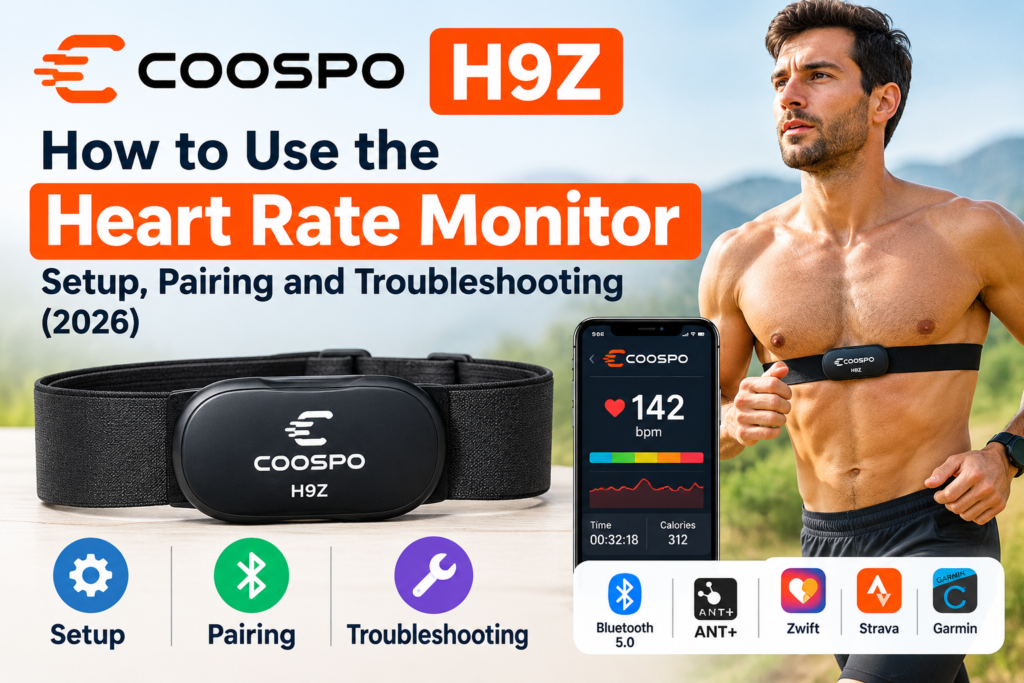
The COOSPO H9Z is a rechargeable chest strap heart rate monitor designed for runners, cyclists, gym users, and people who want to track workout intensity. Before using it, you need to wear the strap correctly, connect it to a compatible app or fitness device, and make sure the sensor is detecting your heart rate.
This guide explains how to set up the COOSPO H9Z, connect it to a smartphone or sports watch, understand its LED indicators, and troubleshoot common connection problems.
If you are still deciding whether this monitor is right for you, start with our COOSPO H9Z Review 2026. If you are comparing alternatives, read our COOSPO H9Z vs Polar H10 comparison.
Quick Answer: How Do You Use the COOSPO H9Z?
To use the COOSPO H9Z, moisten the electrode areas on the chest strap, attach the sensor, and wear the strap snugly against your skin just below your chest muscles. The monitor activates automatically when worn and detects a heart rate signal.
Next, open a compatible fitness app and add the H9Z through the app’s heart rate sensor settings. You can also connect it to a compatible sports watch, cycling computer, or fitness machine using Bluetooth or ANT+.
Important: Do not pair the sensor directly from your phone’s Bluetooth settings when following COOSPO’s app-pairing instructions. Wear the sensor first, then find it through the compatible app.

- Precision Heart Rate Tracking: COOSPO H9Z is equipped with an advanced HR sensor, our heart rate monitor chest strap del…
- Rechargeable & Long-Lasting Battery: Say goodbye to disposable batteries! H9Z built-in rechargeable battery that offers …
- Comfortable Wear: Crafted with soft, breathable materials and an adjustable strap, our heart rate monitor ensures a secu…
1. What Comes in the COOSPO H9Z Box?
The package generally includes:
- COOSPO H9Z heart rate sensor
- Adjustable chest strap
- Magnetic charging dock or charging cable
- User manual
Check your specific package because accessories can vary by product version or seller.
Before the first workout, inspect the strap and sensor, locate the charging contacts, and read the instructions supplied with your unit.
2. How to Wear the COOSPO H9Z Correctly
Correct placement is essential for reliable heart rate readings. A loose strap or dry electrodes may cause delayed, inconsistent, or missing measurements.
Follow these steps:
- Moisten the electrodes. Wet the electrode areas on the inside of the chest strap with a little water. This improves contact between the electrodes and your skin.
- Attach the sensor. Secure the H9Z sensor to the strap’s attachment points.
- Position the strap. Place it directly against your skin, just below your chest muscles, with the sensor centered on your chest.
- Adjust the fit. Tighten or loosen the strap until it stays in place without restricting breathing.
- Start moving or exercising. The sensor activates automatically when worn and detects your heart rate.
If you are wearing the monitor over clothing, it may not detect your heart rate correctly. The electrodes need direct skin contact.
3. How to Connect COOSPO H9Z to an iPhone or Android Phone
The H9Z supports Bluetooth connectivity and can work with compatible fitness applications. COOSPO’s own apps include CoospoRide and Heartool.
Use this general setup process:
- Turn on Bluetooth on your phone.
- Enable any additional phone permissions requested by the app.
- Put on the H9Z so the sensor wakes up.
- Open CoospoRide, Heartool, or another compatible fitness app.
- Open the app’s sensor or device settings.
- Select the option to add a heart rate sensor.
- Find the H9Z in the available sensor list and select it.
- Start a workout and confirm that a heart rate reading appears.
The exact menu names can vary between apps and app versions.
If the sensor does not appear, check that it is being worn, the electrodes are moist, and no other connection is preventing the connection you want.
Official setup instructions: COOSPO H9Z Product and Support Information.
4. How to Connect COOSPO H9Z to a Garmin Watch
You may be able to use the H9Z with a compatible Garmin sports watch that supports external heart rate sensors.
To connect it:
- Put on the H9Z and ensure it detects your heart rate.
- Open the sensor settings on your Garmin watch.
- Choose the option to add a heart rate sensor.
- Wait for the watch to discover the H9Z.
- Select the sensor and complete pairing.
- Start an activity and check that the watch displays the external sensor’s heart rate.
The precise menu depends on your Garmin watch model. Check the watch manual if the sensor menu is difficult to find.
Do not assume every Garmin device supports every connection method. The H9Z supports both Bluetooth and ANT+, but your receiving device must support the relevant protocol.
5. How to Connect COOSPO H9Z to a Bike Computer
The H9Z can also be used with compatible cycling computers that support Bluetooth or ANT+ heart rate sensors.
For a typical setup:
- Wear the chest strap and make sure it is detecting your heartbeat.
- Open the bike computer’s sensor settings.
- Select Add Sensor or Add Heart Rate Sensor.
- Search for nearby sensors.
- Choose the H9Z using the supported connection method.
- Confirm that the computer receives heart rate data before starting your ride.
ANT+ may be convenient if your cycling computer supports it. Bluetooth can also work when supported by the device.
Check your cycling computer’s manual to confirm its sensor capabilities and whether it supports simultaneous connections with other devices.
6. What Do the COOSPO H9Z LED Colors Mean?
One of the H9Z’s distinguishing features is its five-color LED system, which provides a visual indication of heart rate zones.
Heart rate zones generally represent different levels of exercise intensity relative to your estimated or measured maximum heart rate.
| Heart rate zone | Approximate percentage of maximum heart rate | General intensity |
|---|---|---|
| Zone 1 | Below 60% | Very light |
| Zone 2 | 60–70% | Light |
| Zone 3 | 70–80% | Moderate |
| Zone 4 | 80–90% | Hard |
| Zone 5 | 90–100% | Very hard to maximum |
The device’s LED colors correspond to its configured zones. Check the official manual or app for the exact color mapping on your version.
The H9Z uses a default maximum heart rate setting that can be adjusted in supported COOSPO apps. If that setting does not reflect your actual maximum heart rate, the zone indicators may not represent your intended training intensity accurately.
Age-based maximum heart rate formulas are estimates, not precise measurements for every person.
7. How to Charge the COOSPO H9Z
The H9Z uses a rechargeable battery and magnetic charging connection.
To charge it:
- Remove the sensor from the strap if required for convenient access.
- Align the magnetic charging connector with the sensor’s charging contacts.
- Connect the USB cable to a suitable DC 5V power source or computer USB port, following COOSPO’s instructions.
- Allow the sensor to charge.
- Check the indicator light to confirm charging status.
COOSPO recommends approximately 1.5–2 hours for charging and lists about 50 hours of battery life. Actual operating time depends on usage and conditions.
Keep the charging contacts clean and dry before charging. Do not force the magnetic connector into position.
8. Why Is My COOSPO H9Z Not Connecting?
If your phone, watch, or cycling computer cannot find the H9Z, work through these checks.
The sensor does not appear in the app
- Put on the chest strap to wake the sensor.
- Moisten the electrode areas.
- Turn on Bluetooth and any required permissions.
- Search through the app’s sensor menu rather than the phone’s Bluetooth settings.
- Move closer to the receiving device.
The sensor connects but shows no heart rate
- Check that the electrodes touch your skin.
- Make sure the strap is snug and does not slide.
- Re-moisten the electrode areas.
- Check the battery and charging status.
- Restart the app and try again.
The reading keeps dropping
A loose strap or poor electrode contact can cause interruptions. Adjust the strap and ensure that the sensor remains securely attached.
Wireless range, interference, app behavior, and device compatibility can also affect the connection.
The sensor keeps beeping or switching off
Check whether it is detecting a heart rate and whether its battery is charged. COOSPO states that the H9Z can automatically shut down if it fails to detect a heart rate within approximately 12 seconds.
If the issue continues after checking fit, charging, and pairing, consult the manufacturer’s support information.
9. How to Maintain the COOSPO H9Z
Basic care can help keep the sensor and strap working properly.
- Clean the strap according to the manufacturer’s instructions after workouts.
- Allow the strap to dry before storage.
- Keep charging contacts clean.
- Store the monitor in a dry place.
- Inspect the strap and sensor attachments for wear.
- Follow the product’s water-resistance instructions.
The H9Z is rated IP67, but COOSPO explicitly says not to use it for swimming. Do not treat an IP67 rating as a swimming suitability claim.
10. Is the COOSPO H9Z Suitable for Running and Cycling?
The H9Z may suit runners and cyclists who want real-time heart rate data from a chest strap.
For running, it can help you monitor changes in heart rate during steady runs and interval sessions when paired with a compatible device or app.
For cycling, it can send heart rate data to supported bike computers, watches, and training applications.
However, the monitor does not independently provide every training metric. Features such as GPS distance, pace, cycling power, workout history, and training analysis depend on the receiving device or application.
If you are comparing the H9Z with another chest strap, read our COOSPO H9Z vs Garmin HRM-Dual comparison.
11. COOSPO H9Z vs a Smartwatch: Which Should You Use?
A chest strap and a smartwatch measure heart rate differently. The H9Z uses chest electrodes, while most smartwatches use optical sensors on the wrist.
A chest strap may be useful when you want responsive heart rate data during changing exercise intensity. A smartwatch may be more convenient if you want heart rate tracking throughout the day without wearing a separate chest strap.
Neither method is guaranteed to be more accurate in every situation. Fit, movement, device design, and activity type can influence results.
Choose the H9Z if you prefer a dedicated chest strap for workouts. Choose a smartwatch-based approach if convenience and broader wearable features matter more to you.
12. Frequently Asked Questions
Does the COOSPO H9Z turn on automatically?
Yes. It is designed to activate when worn and to switch off automatically when removed, subject to detecting the required heart rate signal.
Can I connect the H9Z to two devices?
The H9Z supports multiple connection options, and COOSPO advertises support for two simultaneous Bluetooth connections. Actual use depends on the receiving devices and their connection requirements.
Do I need the COOSPO app?
Not always. You can use another compatible application or device that supports the H9Z’s Bluetooth or ANT+ heart rate transmission. The COOSPO apps are useful for supported configuration options.
Can I use the H9Z without a smartwatch?
Yes. A compatible smartphone app or another supported receiver can display heart rate data.
Can I wear the H9Z over a shirt?
For normal operation, the electrodes need direct contact with your skin. Wear the strap against your chest rather than over clothing.
Can I swim with the COOSPO H9Z?
No. Although it has an IP67 rating, COOSPO explicitly advises against using the H9Z for swimming.
How long does the battery last?
COOSPO lists approximately 50 hours of battery life. Actual use time may vary.
Final Verdict
The COOSPO H9Z is relatively straightforward to use once you understand its automatic activation, chest strap placement, and app-based pairing process.
For reliable results, moisten the electrodes, wear the strap snugly against your skin, connect through a compatible app or device, and confirm that a heart rate reading appears before exercising.
If you are still deciding whether to buy it, compare its features and limitations with the alternatives in our other COOSPO H9Z guides before making your final choice.
Trusted Resources
- COOSPO H9Z official product page
- COOSPO H9Z user manual and setup instructions
- COOSPO H9Z setup video by COOSPO
Affiliate disclosure: LifeCareBalance may earn a commission from qualifying purchases made through affiliate links, at no additional cost to the reader.
Health disclaimer: A heart rate monitor is intended for exercise tracking and is not a substitute for medical diagnosis or professional medical advice.